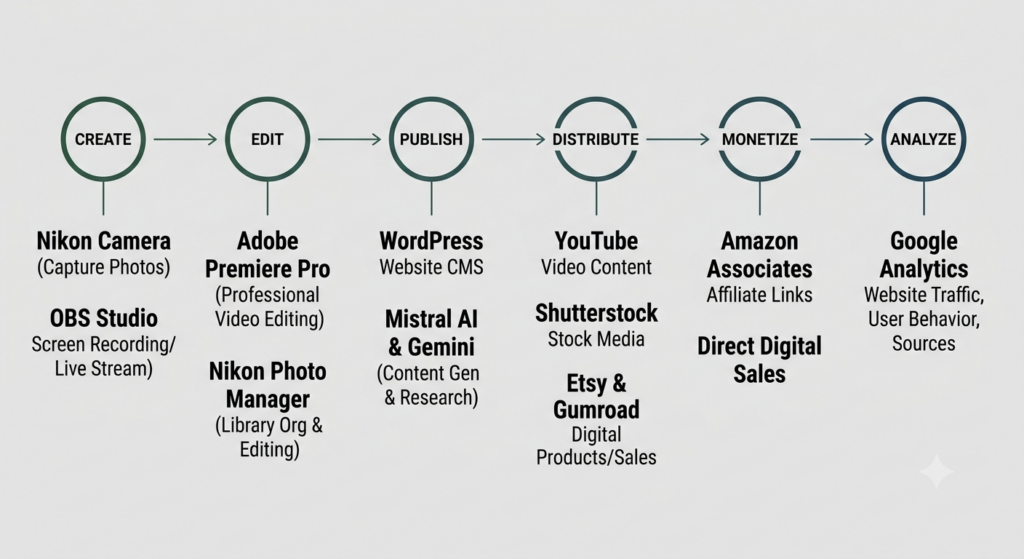

So, you might be looking into solopreneur content creation tools yourself at the moment. Chances are high that you are, since you ended up on this website. Well, I’m not an expert, so I do have to be honest to you about that from the start. But, that doesn’t mean you should click away right here and now. See, if you are a bit like me, you know perfectly well what it is you want to do with your skills. You just need a way to bring it out to the public.
I’ll share with you my current solopreneur content creation tools, or whatever you want to call it. I use these on a almost daily basis to manage my channels, update and maintain this website and help me create my content. I mostly use free tools also, with just a few exceptions such as Adobe and webhosting.
Heads-up though: If you came here thinking AI can do most of the work for you, you’re in for a surprise. Real, quality, attractive content takes time, effort and most of all a human touch. If you want to learn how to leverage AI better, check out this post first. So with that out of the way, let’s get into it.
🎨 Content Creation & Management
The tools I use to produce high-quality photos and videos.
| Tool | Purpose | Why I Use It |
|---|---|---|
| Nikon NX Photo Manager (Free) | Photo organization & editing | Extract photo’s from my DSLR camera and edit the .RAW files before exporting them. |
| Adobe Premiere Pro (Paid) | Video editing | Industry-standard for professional video editing. |
| OBS Studio (Free) | Screen recording & live streaming | Free and open source for capturing content directly from my PC. |
| Canva (Free) | Image alteration such as Thumbnails, digital products, headers or templates | It’s free, it’s powerful and it’s easy to use. Anyone with a mouse and keyboard can start creating, editing or layering low-key templates, thumbnails, headers and more. |
🌐 Website & AI Assistance
How I build websites and keep an overview all my channels
| Tool | Purpose | Why I Use It |
|---|---|---|
| WordPress (paid webhosting, free template) | Website CMS | Easy to use, a lot of out-of-the-box ready functionality. Complemented with AI to generate HTML-blocks with functionality. |
| Mistral AI (Free) | AI assistance and project management | Helps with content research, data analysis, HTML-content and apps and small automation tasks like analytics summarization. Also acts as overseer for the various channels by having a dedicated project per channel. |
| Gemini (Free) | AI assistance | Image generation, code checking and deeper research. |
🚀 Distribution & Sales Channels
Where I publish and share my creative work.
| Platform | Type | What I Use It For |
|---|---|---|
| YouTube Studio (Free) | Video sharing platform | Hosting tutorials, vlogs, and video content |
| Etsy (pay-per-listing) | (Digital) Product Marketplace | Selling digital downloads and print-on-demand products |
| Gumroad (Free) | Digital Download Marketplace | Selling digital products, memberships, and direct downloads for my self-made WordPress Plugins. |
| Shutterstock (Free) | Stock Media photo platform | Licensing photos and videos to a global audience |
💰 Monetization
How I make money from my content and audience.
| Method | Platform | Integration |
|---|---|---|
| Affiliate Links (Free) | Amazon Associates | Embedded in blog posts and product recommendations |
📊 Analytics & Tracking
Measuring performance and understanding my audience.
| Tool | Purpose | Key Metrics |
|---|---|---|
| Google Analytics (Free) | Website traffic | Page views, user behavior, traffic sources |
My Content Workflow