

For well over a year I’ve been trying my hand at growing a Youtube channel. Last year february I picked a niche video-game (Tiny Glade), spun it up and started recording my gameplay. I wanted to keep it low-key so I only lightly edited my video’s. It works better for me if I can fit content creation into my daily schedule. I simply do not have the time to be a full-time content creator.
I thought I had discovered a nice new hobby like this. But what I was not prepared for was all the extra administration that comes with uploading your videos. Thumbnails, SEO, YouTube Tags. What time to upload, subscriber growth, CTR & AVD. I even needed to start understanding the infamous algorithm itself, what a rabbit hole that was.So, I did what any good tech-savvy person with access to the internet does these days to lighten the workload: I asked AI to help me out.
Now, 16 months later after launching my channel, I’m sitting at well over 200 subscribers, 100+ videos, 48.000 unique views and half a million (500.000+) impressions on my channel. I achieved this by finetuning the way I worked with Claude and giving it the right Skills.
Specifically for my YouTube Channel, Claude handles two sides that I know very little about: Metadata administration and YouTube Algorithm Strategy. I will dive into each one today and share with you (for free) my Skill.MD documents. You can add these to Claude yourself should you want to give it a try as well!
This post is part of my broader series on how I use AI in my daily life. Check out the rest here:
YouTube Metadata
YouTube Metadata was a challenge for me to wrap my head around. There we’re so many elements that I needed to know something about to get this right. My title needed to be SEO-proof in relation to my content and my description needed to match it while also enticing users to read and click on my channel links. Tags needed to match the content and intent of my video’s, without becoming repetitive. A single person would never be able to come up with all these data-points in just an hour. But AI could do it in minutes. I just needed a way to “show” it what I was creating.
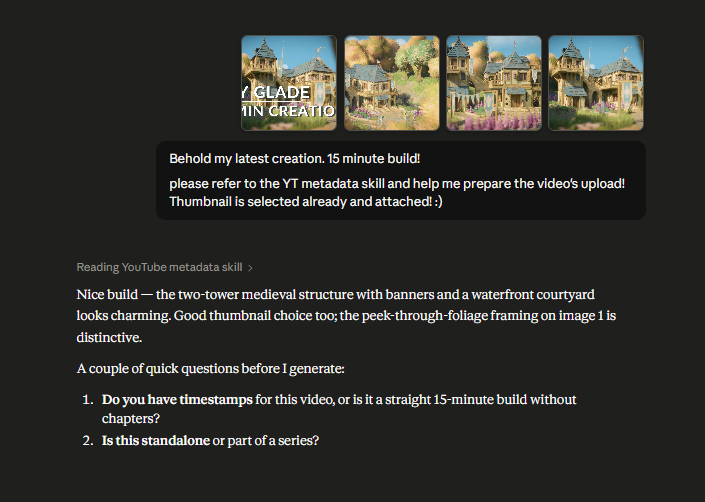
No AI can analyze videos, but they can analyze images and text. So I basically started teaching Claude, in all my sessions over the last 16 months, the intent and meaning of my content via screenshots and scripts. At first I had to input various screenshots and a lot of descriptive text, but over time it got better at seeing what I was creating.
Once I felt confident it was doing a good enough job in analyzing the input, I instructed it to provide me the desired output. That being: a matching Title, description, Tags. At first I needed to correct it here and there, but now it’s at a level where I can simply copy-paste it into YouTube. I summarily check the output, adjust a bit where needed (if at all) and voila, it’s good to go.
YouTube Strategy
Metadata on it’s own can’t make a YouTube video succeed. It needs to be rooted in a direction, vision or strategy. And that’s why this second skill is so important for you to get the most out of Claude as a YouTube Assistant.
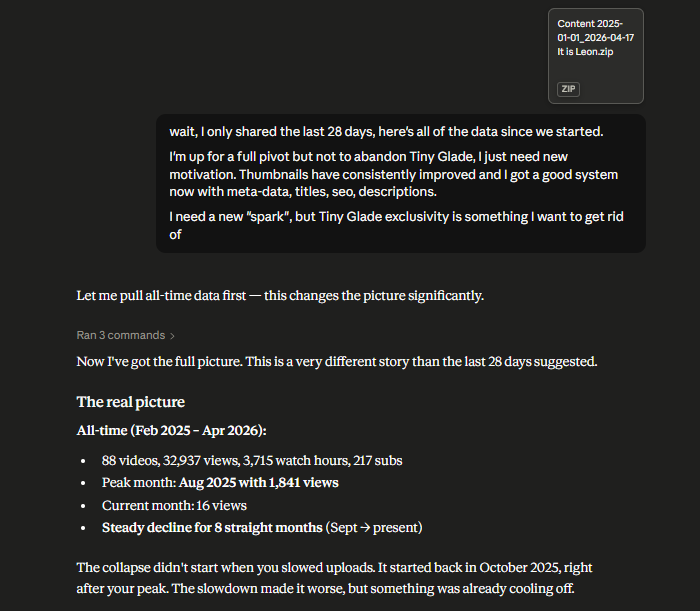
This second skill is all about growth, content direction and understanding the metrics and performances of your videos. Because creating video’s is one thing, but creating content that actually resonates with a audience and pulls in viewers and subscribers is a whole different ballgame. You might be creating great video’s, but if you are consistently getting less then 50 views on new video’s in the first 3 days, something might need to change. And that’s what this skill is for. It does not steer you into brainrot direction, it does not push you to change your content. Your content is unique, it contains your signature, it’s what makes you stand out amongst the crowd.
It does, however, help you make tiny adjustments in the overall direction of your content. Instead of stand-alone video’s, it might advise you to start a series. Or maybe your uploading schedule is wrong. If you’re posting at 17:00 every day, but your audience is watching videos between 15:00 – 16:00 only, they’ll always miss your newest videos.
By uploading screenshots of your metrics, or downloading Youtube .csv reports and giving them to Claude with this skill active, you will be able to analyze the metrics and come up with concrete improvement points.
Claude Projects
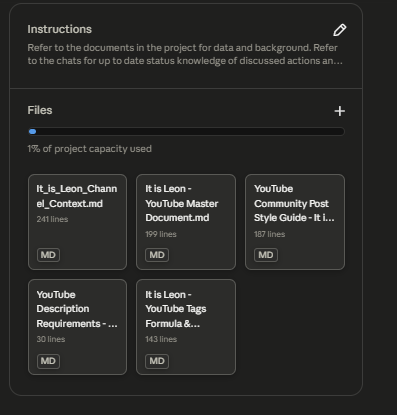
Of course, you’ll need a dedicated Claude Project for all of this to work properly. In the Project space, each chat learns from the last one and you can share documents in it with Claude more easily and in a centralized place. And while these two skill-files are a great start, you’ll need to give Claude a lot more input before it understands fully what you are trying to create.
In my case, I created several .md files with channel input. These range from a Brand guide to video context, community post guidelines and a tags formula. Don’t worry, you can and will create all that when you launch a project and start working with these two Claude Skills for yourself.
If you want to give this a try, simply download the two skills, for free, via the button below. Clicking it will auto-download a small .zip file containing both the Strategy & Metadata skill.MD files. If you’re unfamiliar with Claude Skills and .MD artifacts, read my post here on how to add them or create your own!
Have fun!